This project is scheduled for launch
Launch date: Wednesday, October 28, 2026 at 08:00 AM UTC
Scheduled
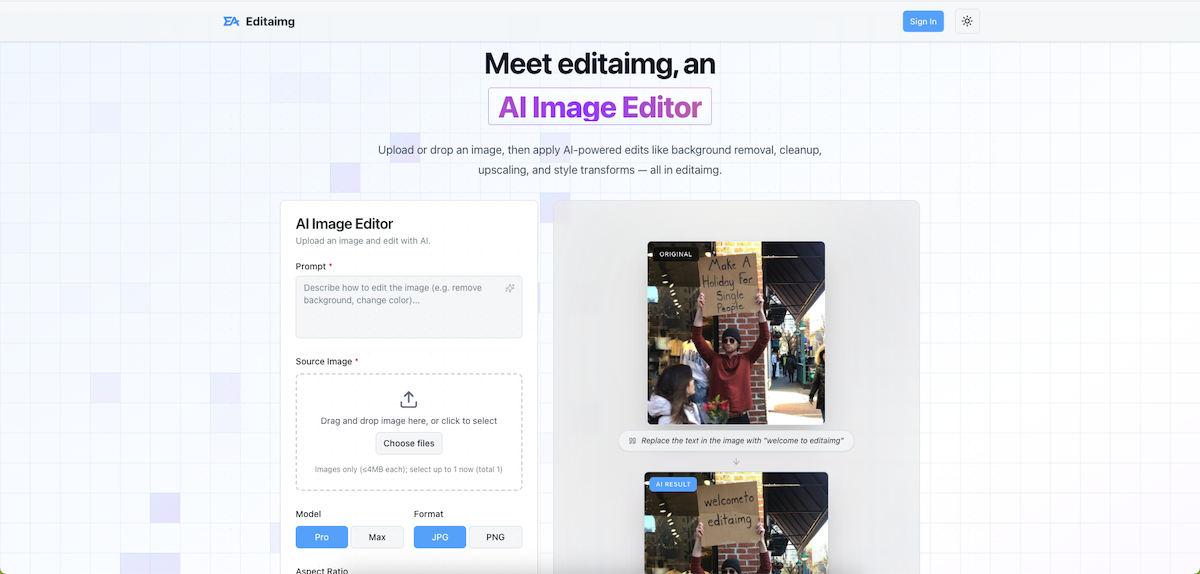
Editaimg is an advanced AI Image Editor designed to streamline photo editing with professional results in one click. It caters to a wide range of users, from e-commerce businesses needing product shot enhancements to individuals looking to perfect personal photos, offering powerful AI-driven tools for various image transformations.
Key Features:
Use Cases:
Editaimg is invaluable for e-commerce businesses, allowing them to create realistic product shots by placing items like a soap dispenser onto a kitchen sink from a simple white-background image. This feature significantly reduces the need for expensive photoshoots and enhances product presentation.
Photographers, especially wedding and event photographers, can leverage Editaimg's AI capabilities to fix common issues like closed eyes in portraits, ensuring high-quality client deliverables without reshoots or complex Photoshop masking. The platform also excels at removing unwanted objects or people from photos, making it perfect for travel enthusiasts who want pristine landscape shots or clean group photos.
For digital marketers and content creators, Editaimg offers tools like the Image Text Editor and AI Image Translator, enabling quick localization of visual content and seamless text modifications within images, crucial for global campaigns and diverse audiences.
Pricing Information:
Editaimg offers a one-time payment model with three tiers: Basic ($9.9 USD for 160 credits), Standard ($29.9 USD for 800 credits), and Pro ($49.9 USD for 4000 credits). All plans include priority generation queue and have no expiration, providing flexible credit usage without subscription requirements.
User Experience and Support:
The platform boasts an intuitive interface where users can simply drag and drop images, describe their desired edits using a prompt box, and fine-tune settings like aspect ratio and style strength. Results are generated quickly, with instant previews and one-click download options. Editaimg provides expert tutorials and guides to help users master its features and achieve stunning visuals.
Technical Details:
While specific programming languages or frameworks are not detailed, Editaimg leverages advanced AI for its image editing capabilities, ensuring intelligent object recognition, seamless blending, and high-quality output across various transformations.
Pros and Cons:
Conclusion:
Editaimg stands out as a versatile and powerful AI Image Editor, making professional-grade photo enhancements accessible to everyone. Its comprehensive suite of tools, from object removal to intelligent upscaling, empowers users to transform images effortlessly. Explore Editaimg today to unlock your creative potential and achieve stunning visual results.
Key Features:
- AI Teeth Fixer: Whiten, straighten, and repair teeth naturally.
- Change Color of Image: Recolor objects and backgrounds while preserving textures.
- Open Eyes in Photo: Fix closed eyes while maintaining natural expressions.
- Image Upscaler: Enlarge photos to 1K, 2K, or 4K without losing detail.
- Jewellery Retouch: Transform product photos into marketplace-ready listings.
- AI Image Translator: Translate text within images to over 130 languages.
Use Cases:
Editaimg is invaluable for e-commerce businesses, allowing them to create realistic product shots by placing items like a soap dispenser onto a kitchen sink from a simple white-background image. This feature significantly reduces the need for expensive photoshoots and enhances product presentation.
Photographers, especially wedding and event photographers, can leverage Editaimg's AI capabilities to fix common issues like closed eyes in portraits, ensuring high-quality client deliverables without reshoots or complex Photoshop masking. The platform also excels at removing unwanted objects or people from photos, making it perfect for travel enthusiasts who want pristine landscape shots or clean group photos.
For digital marketers and content creators, Editaimg offers tools like the Image Text Editor and AI Image Translator, enabling quick localization of visual content and seamless text modifications within images, crucial for global campaigns and diverse audiences.
Pricing Information:
Editaimg offers a one-time payment model with three tiers: Basic ($9.9 USD for 160 credits), Standard ($29.9 USD for 800 credits), and Pro ($49.9 USD for 4000 credits). All plans include priority generation queue and have no expiration, providing flexible credit usage without subscription requirements.
User Experience and Support:
The platform boasts an intuitive interface where users can simply drag and drop images, describe their desired edits using a prompt box, and fine-tune settings like aspect ratio and style strength. Results are generated quickly, with instant previews and one-click download options. Editaimg provides expert tutorials and guides to help users master its features and achieve stunning visuals.
Technical Details:
While specific programming languages or frameworks are not detailed, Editaimg leverages advanced AI for its image editing capabilities, ensuring intelligent object recognition, seamless blending, and high-quality output across various transformations.
Pros and Cons:
- Pros: One-click professional results; No sign-up required for basic edits; Wide range of AI-powered features; Flexible one-time payment model; User-friendly interface.
- Cons: Resolution options might be limited for certain aspect ratios; Specific technical details are not explicitly provided; No free trial mentioned for credit-based features.
Conclusion:
Editaimg stands out as a versatile and powerful AI Image Editor, making professional-grade photo enhancements accessible to everyone. Its comprehensive suite of tools, from object removal to intelligent upscaling, empowers users to transform images effortlessly. Explore Editaimg today to unlock your creative potential and achieve stunning visual results.
Comments
Comments will be available once the project is launched.
Publisher

Launch Date2026-10-28
Platformweb
Pricingfreemium
Tech Stack
#web#AI
Outbid
View🥇 🥈
🥈 🥉
🥉
Want this spot? Pay what you wantBoost Domain Rating - Boost Domain Rating is a platform to discover and upvote the best tech products. Find top products launching daily.
Boost Domain Rating is a platform to discover and upvote the best tech products. Find top products launching daily.
$35
DirEasy - The Best Directory Boilerplate with AI | DirEasy
The best directory boilerplate, packed with AI, Listings, Payment, Submission, CMS, Blog, Authentication, Newsletter, SEO and more.
$30
Quiz Shot - Solve Any Screenshot Question in Seconds.
AI Study Assistant that answers any screenshot question. Get free AI tutor and step-by-step math and homework help with ChatGPT.
$25