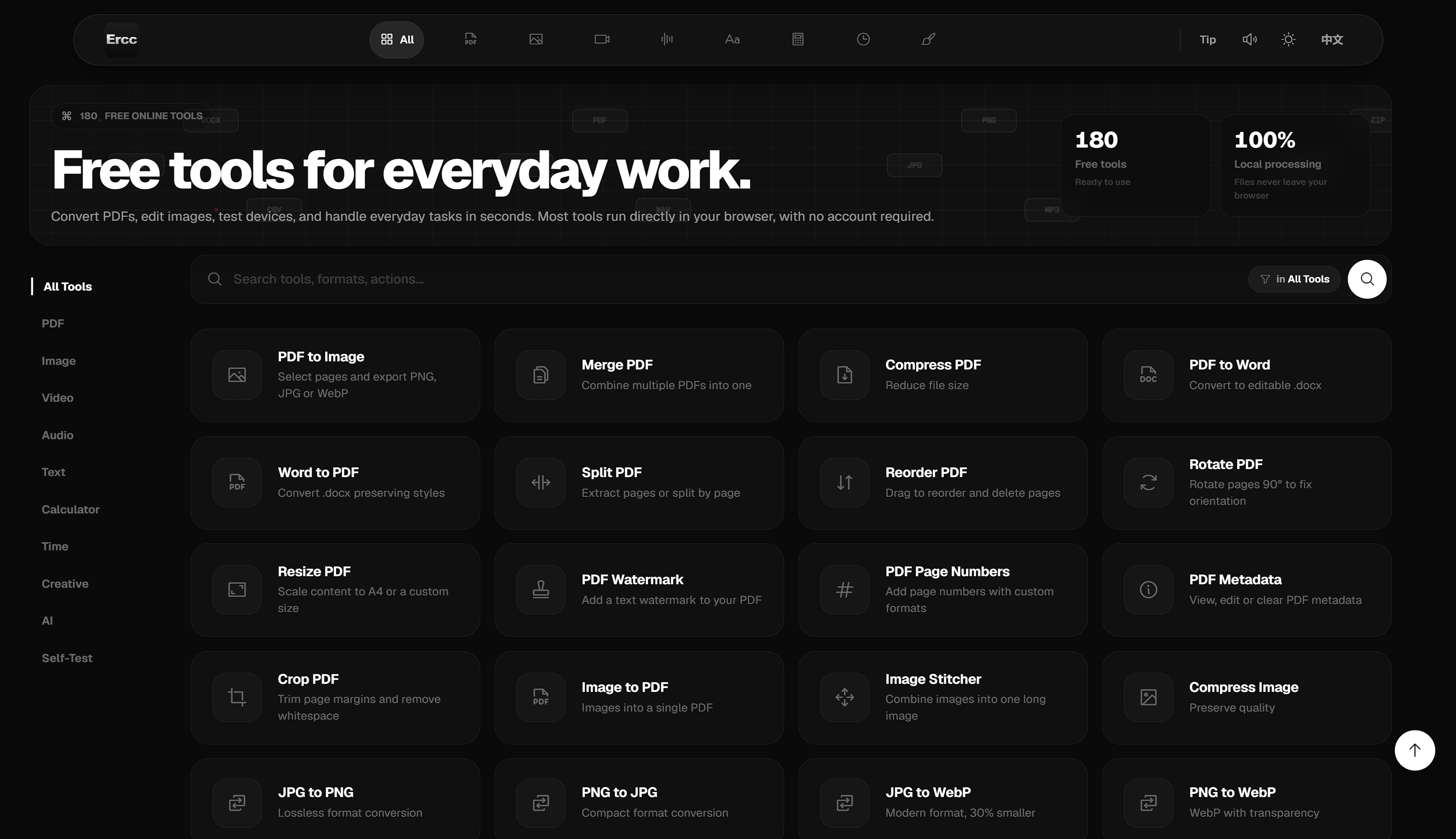
Ercc is a comprehensive, free online toolkit offering over 100 browser-based utilities for everyday digital tasks. It serves individuals and professionals seeking quick, efficient, and privacy-focused solutions for PDF, image, video, audio, and text manipulation, along with various calculators, time management, and creative tools.
Key Features:
Use Cases:
Ercc is ideal for anyone needing to quickly convert PDF documents to images or Word, merge multiple PDFs, or compress large files without compromising readability. Graphic designers and content creators can leverage its image tools for compression, format conversion (JPG to PNG, WebP), background removal, watermarking, and creating image collages or GIF animations. Video editors can compress, crop, merge, rotate, or convert video segments to GIFs, while audio users can record, convert, or edit sound files.
Beyond media, Ercc provides robust text utilities for word counting, formatting (JSON, SQL, Markdown), encryption, and even AI-driven text adventures or content generation. Financial tools like loan calculators, tax calculators, and currency converters assist with personal finance management. Additionally, creative tools such as QR code generators, pixel art converters, and interactive games like dice rolls and coin flips make it a versatile hub for various digital needs.
Pricing Information:
Ercc operates on a completely free model, providing full access to all its tools without any cost. Users are welcome to support the developer by "buying a coffee" as a form of donation, which encourages continued maintenance and development.
User Experience and Support:
The platform is designed for immediate use, requiring no registration or installation. Its intuitive interface allows users to open a tool and start working instantly. A strong emphasis on privacy is highlighted by 100% local file processing, ensuring that sensitive data never leaves the user's device. While direct support channels aren't explicitly detailed, a "Feedback and Suggestions" section indicates avenues for user input.
Technical Details:
Ercc primarily leverages client-side web technologies, with most tools executing directly within the user's browser. This architecture ensures that file processing is performed locally, enhancing privacy and reducing server load. The platform is built for efficiency and accessibility across various web browsers.
Pros and Cons:
Conclusion:
Ercc stands out as an invaluable, privacy-first online toolkit, offering a vast collection of free, browser-based utilities for everyday digital tasks. Its commitment to local processing and ease of use makes it an excellent choice for anyone seeking quick and secure solutions. Explore Ercc today to streamline your digital workflow and discover a world of convenient tools at your fingertips.
Key Features:
- Over 100 diverse tools for PDF, image, video, audio, and text processing.
- 100% local file processing ensures user privacy and data security.
- No registration or account creation required, offering instant access.
- All tools run directly in the browser, eliminating software downloads.
- Includes AI-powered tools for text adventure, life trajectory prediction, and tarot.
- Offers a wide array of practical utilities from file conversion to personal finance calculators.
Use Cases:
Ercc is ideal for anyone needing to quickly convert PDF documents to images or Word, merge multiple PDFs, or compress large files without compromising readability. Graphic designers and content creators can leverage its image tools for compression, format conversion (JPG to PNG, WebP), background removal, watermarking, and creating image collages or GIF animations. Video editors can compress, crop, merge, rotate, or convert video segments to GIFs, while audio users can record, convert, or edit sound files.
Beyond media, Ercc provides robust text utilities for word counting, formatting (JSON, SQL, Markdown), encryption, and even AI-driven text adventures or content generation. Financial tools like loan calculators, tax calculators, and currency converters assist with personal finance management. Additionally, creative tools such as QR code generators, pixel art converters, and interactive games like dice rolls and coin flips make it a versatile hub for various digital needs.
Pricing Information:
Ercc operates on a completely free model, providing full access to all its tools without any cost. Users are welcome to support the developer by "buying a coffee" as a form of donation, which encourages continued maintenance and development.
User Experience and Support:
The platform is designed for immediate use, requiring no registration or installation. Its intuitive interface allows users to open a tool and start working instantly. A strong emphasis on privacy is highlighted by 100% local file processing, ensuring that sensitive data never leaves the user's device. While direct support channels aren't explicitly detailed, a "Feedback and Suggestions" section indicates avenues for user input.
Technical Details:
Ercc primarily leverages client-side web technologies, with most tools executing directly within the user's browser. This architecture ensures that file processing is performed locally, enhancing privacy and reducing server load. The platform is built for efficiency and accessibility across various web browsers.
Pros and Cons:
- Pros:
- Completely free with no hidden costs.
- Strong privacy focus with local file processing.
- Extremely wide range of tools covering many categories.
- No registration or account required for instant access.
- User-friendly interface, easy to navigate and use.
- Cons:
- No explicit mention of API access for automation.
- Lack of dedicated customer support or tutorials.
- May not offer the advanced features found in specialized paid software.
Conclusion:
Ercc stands out as an invaluable, privacy-first online toolkit, offering a vast collection of free, browser-based utilities for everyday digital tasks. Its commitment to local processing and ease of use makes it an excellent choice for anyone seeking quick and secure solutions. Explore Ercc today to streamline your digital workflow and discover a world of convenient tools at your fingertips.
Comments
Publisher

Launch Date2026-09-04
Platformweb
Pricingfree
Tech Stack
#web
Outbid
View🥇 🥈
🥈 🥉
🥉
Want this spot? Pay what you wantBoost Domain Rating - Boost Domain Rating is a platform to discover and upvote the best tech products. Find top products launching daily.
Boost Domain Rating is a platform to discover and upvote the best tech products. Find top products launching daily.
$35
DirEasy - The Best Directory Boilerplate with AI | DirEasy
The best directory boilerplate, packed with AI, Listings, Payment, Submission, CMS, Blog, Authentication, Newsletter, SEO and more.
$30
Quiz Shot - Solve Any Screenshot Question in Seconds.
AI Study Assistant that answers any screenshot question. Get free AI tutor and step-by-step math and homework help with ChatGPT.
$25