Open source

SongFlip is a seamless music link redirector for mobile devices, designed to enhance your music listening experience. It automatically opens shared music links from various platforms directly in your preferred music streaming service, eliminating friction and unnecessary steps. This tool is ideal for anyone who frequently shares or receives music links in chats, social media, or browsers and desires a consistent, direct playback experience.Key Features0-Click Direct Playback on Android (1-Click on iOS via Share Sheet)Universal Streaming Freedom across Spotify, Apple Music, YouTube Music, Tidal, Deezer, and Amazon Music100% Ad-free, Private, and Open Source (GPLv3, zero tracking)Multi-API Smart Engine for accurate matching of tracks, albums, and artistsOptional PRO feature: Universal Smart Share Links with rich album art and 1-tap playbackNative support for 22 languagesUse Cases Imagine a scenario where friends send you music links from various streaming services like Spotify or Apple Music, but you primarily use YouTube Music. SongFlip seamlessly bridges this gap by automatically opening these links in your chosen player, saving you the hassle of manual searching or dealing with login prompts. For instance, tapping a Spotify link in WhatsApp will instantly play the song in your preferred app, such as YouTube Music, without any intermediate steps. For power users, SongFlip PRO extends this convenience to sharing. If you want to recommend a song to friends who use different streaming services, the PRO version allows you to generate a single, universal smart link. This link provides a clean landing page with album art and 1-tap playback buttons for all major players, ensuring everyone can enjoy your shared music instantly, regardless of their preferred service.Pricing Information SongFlip operates on a freemium model. All core redirection features, including automatic opening of songs, albums, and artists across supported services, are completely free forever and ad-free, requiring no user account. For those seeking advanced capabilities, an optional PRO version is available, starting from $0.99 per month or a one-time lifetime purchase of $19.99. PRO features include universal smart share links, high-speed server cache, enhanced AI matching for rare versions, and cross-platform playlist sync (in development).User Experience and Support SongFlip is designed for effortless use, requiring a simple 30-second setup. Once configured, it works silently in the background, providing a frictionless "set it once – enjoy music forever" experience. The user interface is minimal, focusing on direct playback. Support is provided through a comprehensive FAQ section, helpful guides and tips for various streaming services, and the transparency of its GPLv3 open-source code, allowing for community verification and trust.Technical Details The application leverages a high-performance multi-stage resolution engine that runs primarily locally on your device, ensuring maximum privacy. This engine combines an ultra-fast local in-memory app cache (< 5ms), deep Odesli metadata extraction, direct YouTube Video ID matching, and official streaming search APIs (iTunes & Deezer) for accurate 0-click routing. PRO features further enhance this with a global server-side LV2 cloud cache for zero-latency matches and enhanced AI matching powered by Gemini for identifying rare remixes and versions. The entire codebase is auditable GPLv3 open source, emphasizing security and data privacy.Pros:Seamless 0-click (Android) / 1-click (iOS) direct music playback.Broad compatibility with all major streaming services.Commitment to 100% privacy, ad-free experience, and open-source code.Extremely easy and quick initial setup.Supports tracks, full albums, and artist profiles.Available natively in 22 languages.Conclusion SongFlip stands out as an essential tool for anyone looking to streamline their digital music experience, offering unparalleled convenience and privacy in handling shared music links. Its robust redirection capabilities, coupled with a strong emphasis on user control and data protection, deliver significant value. Explore SongFlip today to transform how you interact with music links and enjoy your favorite tunes instantly.

MapFlip: Seamless Apple Maps Link Redirection for AndroidMapFlip is an innovative Android application designed to seamlessly redirect Apple Maps links directly into Google Maps. It eliminates the frustration of "link-hijacking" and slow browser web views, providing Android users with a smooth, native navigation experience. This tool is perfect for anyone who frequently receives Apple Maps links in chats, emails, or other applications and prefers to use Google Maps for navigation.Key Features:100% Local & Private: Operates entirely offline with zero internet permissions, ensuring no data collection or tracking.Open Source & Free: Available under the MIT license on GitHub, completely free of charge and ad-free.Native Google Maps Integration: Opens links directly in the Google Maps app, enabling full native navigation and Android Auto support.Seamless Redirection: Automatically detects and converts Apple Maps URLs (maps.apple.com) to Google Maps.Pause Mode: Includes a Quick Settings Tile to temporarily disable redirection, allowing original Apple Maps links to open if desired.Multi-language Support: Fully localized in 14+ languages for a global user base.Use Cases:MapFlip addresses a common pain point for Android users: receiving Apple Maps links from iPhone users. Instead of being forced into a sluggish browser-based Apple Maps view that lacks direct navigation and Android Auto support, MapFlip instantly opens the location in the user's preferred Google Maps application. This is particularly beneficial for drivers, motorcyclists, and commuters who need immediate, turn-by-turn directions without workflow interruptions.Whether you receive a location via WhatsApp, Telegram, email, or SMS, MapFlip ensures a frictionless experience. It's ideal for coordinating meetups, sharing addresses, or simply getting directions from contacts who use Apple devices, transforming a potential frustration into a smooth, efficient process.Pricing Information:MapFlip is 100% free to use, completely ad-free, and open-source under the MIT license. There are no hidden costs, subscriptions, or in-app purchases.User Experience and Support:The app boasts a straightforward setup process, requiring users to simply install it and activate it as a link handler. Its intuitive design includes a convenient Quick Settings Tile for quick toggling of the redirection feature. While direct support channels aren't explicitly mentioned, the comprehensive FAQ section within the provided text suggests a self-service approach to common queries. The app's commitment to privacy and local processing also contributes to a trustworthy user experience.Technical Details:MapFlip functions as a lightweight link converter. It registers itself as a native link handler for maps.apple.com URLs. Upon tapping a link, the app locally extracts coordinates or search queries and passes them directly to the native Google Maps application. It requires no internet permissions, performs all processing offline on the device, and uses no tracking or advertising SDKs, ensuring minimal battery consumption and maximum privacy.Pros and Cons:Pros:Solves a specific, common problem for Android users.Enhances user experience by enabling native Google Maps navigation.Strong privacy guarantees (0 internet permissions, no tracking, local processing).Completely free and open-source.Supports Android Auto for seamless in-car navigation.Minimal battery consumption.Conclusion:MapFlip offers an elegant, privacy-conscious, and highly effective solution for Android users who frequently encounter Apple Maps links. By seamlessly redirecting these links to Google Maps, it significantly improves navigation efficiency and user workflow. Explore MapFlip today to transform your mapping experience on Android.

Zod is a powerful, TypeScript-first schema validation library designed to ensure data integrity and type safety across your applications. It allows developers to define robust schemas for validating data, ranging from simple primitives to complex, deeply nested objects, making it an essential tool for modern TypeScript development.It targets developers building applications with TypeScript who need reliable and type-safe data validation for APIs, forms, and general data processing.Key FeaturesZero external dependencies, ensuring a lightweight footprint.Works seamlessly in both Node.js environments and all modern browsers.Extremely tiny core bundle size, gzipped to just 2kb.Provides an immutable API, with methods returning new instances for predictable state management.Offers a concise and intuitive interface for defining schemas.Includes built-in conversion capabilities for JSON Schema.Boasts an extensive ecosystem of integrations and supporting libraries.Use CasesZod excels in scenarios where data validation is critical for application stability and security. Developers can use Zod to define the expected structure and types of incoming data from API endpoints, ensuring that only valid data is processed. This prevents common bugs and security vulnerabilities associated with malformed or unexpected input.Beyond API validation, Zod is widely adopted for form validation, particularly in frontend frameworks. Its integration with libraries like React Hook Form provides a seamless experience for building type-safe forms with robust client-side validation. It also serves as an excellent tool for validating configuration files, environment variables, or any internal data structures within a TypeScript project, guaranteeing consistency and correctness.Pricing InformationZod is an open-source library, making it freely available for use in any project. While there are no direct pricing tiers for the library itself, it encourages sponsorship at various levels to support its ongoing development and maintenance.User Experience and SupportDesigned with a "TypeScript-first" philosophy, Zod offers an excellent developer experience with static type inference that guides you as you define schemas. Its concise API makes schema definition straightforward, even for complex data structures. Comprehensive documentation is available, and community support can be found through its Discord channel, fostering a collaborative environment for users.Technical DetailsZod is built for TypeScript environments, officially supporting TypeScript v5.5 and later. It operates without any external dependencies, contributing to its small bundle size and high performance. The library is compatible with both Node.js runtimes and modern web browsers, offering broad applicability across different project types.Pros and ConsPros:TypeScript-first with powerful static type inference.Extremely lightweight with zero external dependencies.Highly performant and works universally across environments.Immutable API promotes predictable code.Extensive ecosystem and community support.Built-in JSON Schema conversion.Cons:Requires TypeScript v5.5+ for full official support.While concise, complex schemas might have a slight learning curve for newcomers.ConclusionZod stands out as a premier TypeScript-first validation library, offering an unparalleled combination of type safety, performance, and developer experience. Its ability to define and validate data schemas with static type inference makes it an indispensable tool for building robust and reliable applications. Explore Zod today to elevate your data validation strategy and enhance your TypeScript projects.

Build your digital product business. Without having to figure everything out yourself. Launch90 guides you from initial idea to a sales-ready digital product. You build your product, landing page, sales funnel, website, emails, videos, and promotional materials—all from a single, streamlined platform. Build an online product business in 7 steps.No complex, disjointed tools—just one guided workspace to build your product and sales funnel. A dedicated environment on our server. The package includes: A tool to generate e-books A tool to create pages and sales funnels A website builder Email campaign setup Video Studio AI Avatar functionality (currently in development; scheduled for Q4 2026) Social media integration Traffic builder Affiliate program Everything is designed to guide you toward your ultimate goal; all modules are interconnected, and your monthly subscription costs won't skyrocket. You pay $39.95 per month (excl. VAT), which covers all tools, AI credits, hosting, and your dedicated server.A digital Launch90 license with access to the Launch90 platform tools included in this offer. Your purchase includes [list the exact modules and resources]. This is a digital product; no physical item will be shipped.Your access instructions will be sent by email after purchase.
Docusaurus is an open-source static site generator designed to help developers and teams quickly build optimized documentation websites, blogs, and marketing pages. It empowers users to focus on content creation by leveraging modern web technologies and a pluggable architecture.Targeted at open-source projects, engineering teams, and anyone needing robust, versioned, and localized content sites, Docusaurus streamlines the process of publishing high-quality web content.Key Features Powered by MDX: Write documentation and blog posts using Markdown with embedded React components for rich, interactive content. Built Using React: Extend and customize your site's layout and functionality with familiar React components. Ready for Translations: Out-of-the-box localization support, compatible with Git, Crowdin, and other translation managers. Document Versioning: Maintain multiple versions of your documentation, keeping it in sync with project releases. Content Search: Integrated search functionality, proudly supporting Algolia for efficient content discovery. Pluggable Architecture: Design and customize your site while reusing data created by Docusaurus plugins.Use CasesDocusaurus is ideal for open-source projects like Redux, React Native, and Temporal, where maintaining comprehensive and up-to-date documentation is crucial. It allows project maintainers to easily manage content, support multiple versions, and provide localized experiences to a global audience. Companies like Supabase also leverage Docusaurus to build and maintain their product documentation efficiently, reducing the time spent on infrastructure and focusing on delivering valuable content.Beyond documentation, Docusaurus serves as an excellent tool for creating content-focused websites, personal blogs, and marketing pages. Its ability to embed React components within Markdown makes it versatile for interactive tutorials and dynamic content, while features like versioning and localization ensure scalability and reach for any content-driven initiative.Pricing InformationDocusaurus is an open-source project, making it free to use. While there's no direct pricing model, the community and project maintainers are supported through sponsorships, as highlighted by Temporal's contribution.User Experience and SupportUsers consistently praise Docusaurus for its ease of setup and use, allowing them to "focus on content" rather than complex configurations. Its intuitive approach makes it "simple to setup" and "friendly for new contributors." The project boasts a strong community with support available via Stack Overflow, Discord, and GitHub, ensuring users can find help and contribute to its ongoing development.Technical DetailsBuilt upon React, Docusaurus processes MDX files to generate static HTML, CSS, and JavaScript. This approach ensures optimized performance and easy deployment. Its pluggable architecture allows for deep customization and integration with various tools and services, making it a flexible choice for modern web development.Pros and Cons Pros: Optimized static site generation, MDX support for rich content, React extensibility, built-in localization and versioning, integrated search, strong community, easy to set up and maintain, ideal for documentation and content sites. Cons: Requires familiarity with React for advanced customization, primarily focused on static content generation (less suitable for highly dynamic, server-rendered applications without additional tooling).ConclusionDocusaurus stands out as a robust and developer-friendly solution for building and maintaining high-quality, content-focused websites. Its blend of modern web technologies, powerful features, and an active community makes it an excellent choice for anyone looking to create efficient, scalable, and well-documented online presences. Explore Docusaurus today to streamline your content delivery!
Tremor is an open-source React component library designed to empower developers to build beautiful, accessible, and production-ready dashboards and analytical interfaces with speed and efficiency. It serves as a comprehensive toolkit for creating data-rich applications, allowing teams to focus on insights rather than intricate UI design. Key Features 35+ fully open-source, accessible components for dashboards and charts. Built with React, Tailwind CSS, and Radix UI for modern web development. Beautiful defaults and simple props for easy customization and pixel-perfect design. Modular input components for advanced filtering, including Date Pickers, Range Sliders, and Multi-Logic Filters. Advanced visualizations like Tracker, Bar Lists, Data Bars, Spark Charts, and Progress Circles for complex data representation. Over 250 blocks and templates, including pre-defined dashboards and analytical interfaces, to accelerate project kick-off. Use Cases Tremor is ideal for developers and product teams looking to integrate sophisticated data visualization into their web applications. It excels in scenarios requiring the creation of internal analytics dashboards, customer-facing data portals, or any application where data needs to be presented clearly and interactively. By providing a robust set of components and templates, Tremor significantly reduces the development time and effort typically associated with building complex analytical UIs. Furthermore, Tremor can be leveraged to build entire SaaS marketing websites, report pages, and full-fledged data applications. Its production-ready templates, crafted with React and Next.js, offer a head start for launching new ideas, ensuring a consistent and high-quality user experience from the outset. It solves the common problem of needing to design and build custom UI components for data display, allowing teams to deliver value faster. Pricing Information Tremor operates on a freemium model, offering a core set of 35+ fully open-source components for free. Additionally, it provides access to "Premium Blocks" and "Tremor Templates" which likely offer more advanced or pre-built solutions, catering to various project needs and budgets. Specific pricing tiers for premium offerings are not detailed in the provided content. User Experience and Support The library emphasizes a smooth user experience with "beautiful defaults" and "simple props," enabling developers to customize components quickly and spend less time on design. Its "accessible by design" philosophy, built on Radix UI, ensures that the resulting interfaces are inclusive. Tremor offers comprehensive "Docs" and a "Changelog" for developers, alongside "Contact us" options for support. Getting started is made easy with both copy-and-paste options for individual components and an NPM package for quick integration. Technical Details Tremor is primarily built for the React ecosystem, leveraging the popular Tailwind CSS framework for styling and Radix UI for accessibility primitives. Its chart components are built on Recharts. For its extensive collection of blocks and templates, it utilizes React and Next.js, making it a powerful choice for modern web applications. Pros and Cons Pros: Open-source and accessible; significantly speeds up dashboard development; beautiful, customizable defaults; extensive component and template library; strong community backing; built with modern, popular technologies (React, Tailwind, Radix UI); supports complex data filtering and visualization. Cons: Primarily focused on React/Next.js ecosystem, which might be a limitation for non-React projects; "Premium Blocks" imply potential costs for advanced features; while simple props are highlighted, extensive customization might still have a learning curve. Conclusion Tremor stands out as an invaluable resource for developers aiming to create sophisticated, data-driven web applications with efficiency and elegance. Its blend of open-source components, production-ready templates, and a focus on accessibility makes it a compelling choice for any project requiring robust data visualization. Explore Tremor today to transform your data into compelling visual stories.
Convex is a powerful backend-as-a-service (BaaS) that provides developers with the essential building blocks to create real-time, full-stack applications. It allows expressing the entire backend, from database schemas to APIs and authentication, in pure TypeScript, offering a seamless and type-safe development experience. Convex targets developers and startups looking to build and scale their applications with confidence, simplifying complex backend infrastructure.Key Features:Everything is Code: Define database schemas, queries, auth, and APIs entirely in TypeScript, living alongside your app code with type-checking and autocompletion.Always in Sync: Guarantees real-time updates across frontend, backend, and database state, eliminating the need for state managers, cache invalidation, or websockets.AI Coding: Leverage AI to generate high-quality Convex code, enhancing developer productivity.Backend Built-ins: Includes features like cron jobs, backend AI workflows, built-in authentication (80+ OAuth integrations), and a growing ecosystem of modular components.Open Source: Self-host and develop locally, with support for open-source projects.Strong Consistency & ACID Database: Provides a reliable and robust data store with vector search capabilities.Use Cases:Convex is ideal for developers aiming to build modern, real-time web applications without the overhead of managing complex backend infrastructure. It simplifies the creation of interactive user interfaces where data needs to be instantly reflected across clients, such as collaborative tools, chat applications, or live dashboards. For instance, a developer can quickly build a full-stack todo application with real-time updates, AI categorization, and robust authentication using Convex's TypeScript-first approach. It also serves as a powerful platform for building AI agents, providing the necessary backend components to manage data and workflows. Startups can leverage Convex to rapidly prototype and scale their products, benefiting from its integrated features and end-to-end type safety, which significantly reduces development time and potential bugs.Pricing Information:While specific pricing tiers are not detailed in the provided content, Convex offers a "Pricing" section on its website, suggesting a structured pricing model. Given its nature as a developer tool, it likely includes a freemium option or a free trial to allow developers to get started and explore its capabilities before committing to a paid plan.User Experience and Support:Convex is praised by developers for its exceptional developer experience (DX), often described as "magical" and "simple, fast, realtime." It provides comprehensive documentation, quickstart guides for popular frameworks like React, Next.js, and Vue, and a vibrant community Discord for sharing ideas and asking for help. The platform emphasizes ease of use, with many users highlighting its ability to simplify complex tasks like state management and real-time updates.Technical Details:Convex is built around a TypeScript-first philosophy, allowing developers to define their entire backend logic, database schemas, and API endpoints using TypeScript. It integrates seamlessly with modern frontend frameworks such as React, Next.js, Vue, Svelte, and even Python and Rust. Under the hood, it provides an ACID-compliant document database with vector search capabilities, serverless functions, and real-time synchronization mechanisms, abstracting away the complexities of websockets and state management.Pros and Cons:Pros:End-to-end type safety and autocompletion with TypeScript.Built-in real-time updates without manual setup.AI code generation for increased productivity.Simplified backend development, replacing multiple services (DB, auth, APIs, cron).Strong community and excellent developer experience.Open-source components and self-hosting options.Cons:Primarily focused on the TypeScript/JavaScript ecosystem.Adopting a new paradigm might have a learning curve for some developers.Specific pricing details are not immediately available in the provided text.Reliance on a single vendor for core backend services.Conclusion:Convex offers a compelling solution for developers seeking to streamline backend development and build real-time applications with unparalleled ease and type safety. By unifying the backend into a TypeScript codebase, it significantly reduces complexity and accelerates development cycles. Explore Convex today to transform your application development workflow and build with confidence.
Build your digital product business. Without having to figure everything out yourself. Launch90 guides you from initial idea to a sales-ready digital product. You build your product, landing page, sales funnel, website, emails, videos, and promotional materials—all from a single, streamlined platform. Build an online product business in 7 steps.No complex, disjointed tools—just one guided workspace to build your product and sales funnel. A dedicated environment on our server. The package includes: A tool to generate e-books A tool to create pages and sales funnels A website builder Email campaign setup Video Studio AI Avatar functionality (currently in development; scheduled for Q4 2026) Social media integration Traffic builder Affiliate program Everything is designed to guide you toward your ultimate goal; all modules are interconnected, and your monthly subscription costs won't skyrocket. You pay $39.95 per month (excl. VAT), which covers all tools, AI credits, hosting, and your dedicated server.A digital Launch90 license with access to the Launch90 platform tools included in this offer. Your purchase includes [list the exact modules and resources]. This is a digital product; no physical item will be shipped.Your access instructions will be sent by email after purchase.
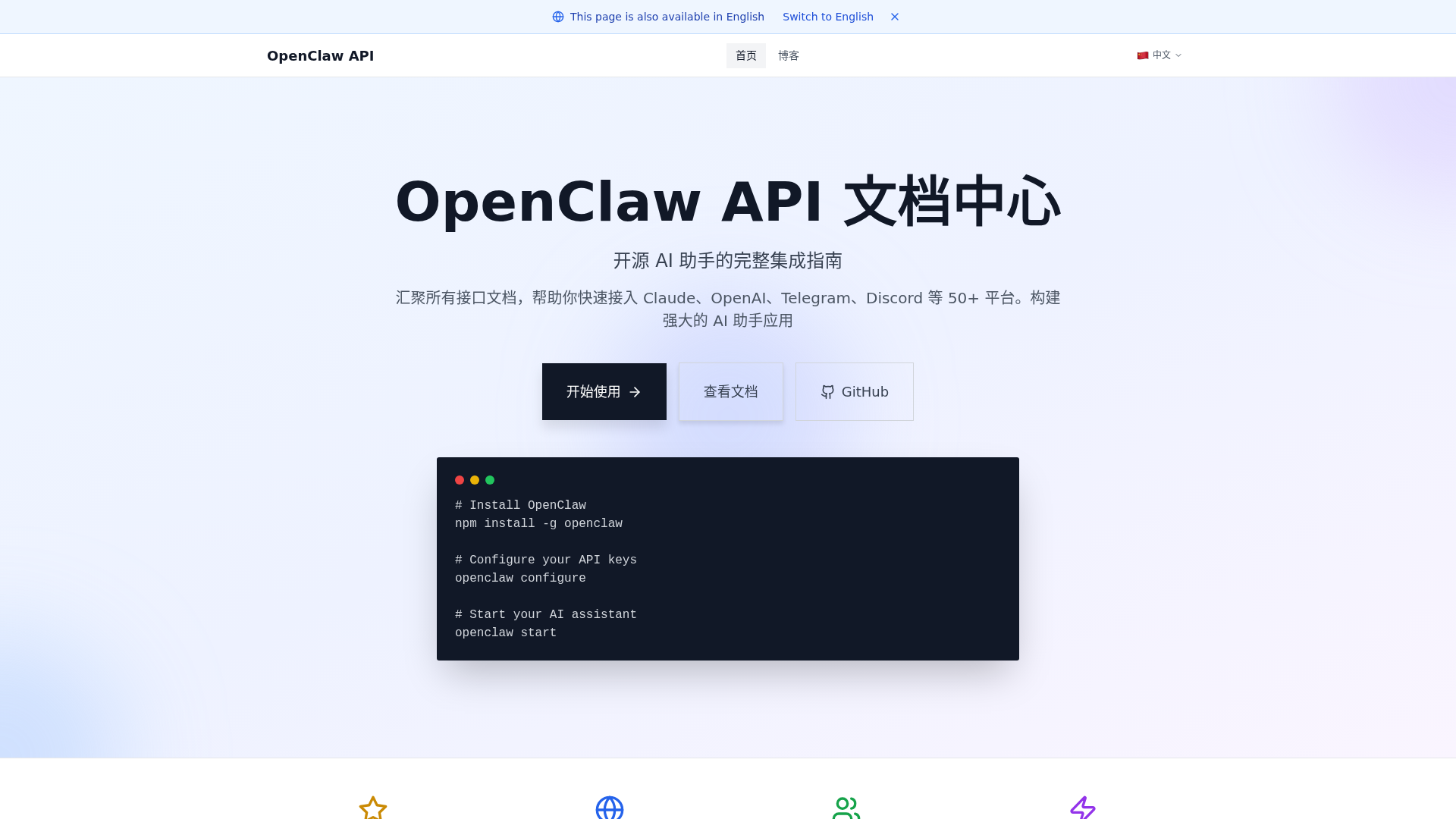
OpenClaw API is a comprehensive, open-source integration guide designed to empower developers in building powerful AI assistant applications. It consolidates interface documentation for over 50 platforms, including leading AI models like Claude and OpenAI, and communication channels such as Telegram and Discord. Its primary purpose is to simplify the integration of advanced AI capabilities into various applications, offering a robust and flexible framework for both personal and enterprise use.Key Features:Multi-model support for Anthropic Claude, OpenAI, Google Gemini, and local Ollama.Seamless integration with 20+ communication platforms like Telegram, Discord, Slack, and WhatsApp.Local-first architecture ensuring data control, private deployment, and Docker isolation.Advanced multimodal interaction capabilities, including voice calls and browser control.Extensible system with plugin-like skill extensions, supporting timed tasks and Webhooks.Completely open-source, community-driven, and continuously maintained.Use Cases:OpenClaw API is ideal for developers and teams looking to leverage AI across various scenarios. Individuals can create personalized AI assistants accessible via platforms like Telegram or WhatsApp, enhancing daily productivity and information access. For teams, it serves as a powerful collaboration tool, integrating AI into platforms like Slack or Discord to streamline communication, automate tasks, and improve overall efficiency.Furthermore, OpenClaw API facilitates the creation of sophisticated automated workflows. By utilizing its Webhooks and timed task interfaces, users can design intelligent systems that respond to events, process data, and execute actions across different services, transforming routine operations into smart, automated processes.Pricing Information:OpenClaw API is an entirely open-source project, making it free to use. It is community-driven, ensuring continuous updates and maintenance without any direct cost for its core functionalities.User Experience and Support:The platform emphasizes an "extremely simple" installation and configuration process, enabling users to build their first AI assistant in just three steps and five minutes. It provides a command-line tool for quick integration and offers comprehensive documentation, tutorials, and best practices through its blog. A dedicated FAQ section and technical support resources are available to address configuration and development queries, ensuring a smooth user experience.Technical Details:OpenClaw employs a modular architecture, utilizing a multi-model driven engine that supports native integration with major LLMs and leverages Function Calling for intelligent tool invocation. Its core features include a high-performance WebSocket-based distributed communication gateway for real-time synchronization and enterprise-grade security practices, such as mandatory environment variable or encrypted JSON5 configuration for sensitive credentials. The system also features a plugin-like skill extension mechanism following OpenAPI specifications.Pros:Extensive support for diverse AI models and communication platforms.Open-source and free, fostering community collaboration.Local-first architecture provides data privacy and control.High extensibility through plugin-like skills and Webhooks.Simplified installation and configuration process.Robust security practices for credential management.Cons:Community-driven support might vary in response time compared to commercial offerings.Advanced customization for complex AI agents may require deeper technical understanding.Reliance on external API keys for commercial AI models.Conclusion:OpenClaw API stands out as a versatile and powerful open-source solution for integrating AI into a multitude of applications and communication channels. Its focus on ease of use, extensive compatibility, and local data control makes it an excellent choice for developers aiming to build intelligent, secure, and scalable AI assistants. Explore OpenClaw API today to unlock the full potential of AI in your projects.